AZURE-RTOS ThreadX in the STM32Cube ecosystem
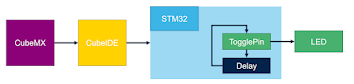
ThreadX 1.Blink Led : step 0 : Prepare project for CubeMX and CubeIDE step1 :blink led 1.Create first thread : step2 : Add ThreadX in CubeMX In CubeMX Tab: Software packs Select components Open X-Cube-Azure-H7 Opne RTOS : Select ThreadX / Core Click OK Step3 : Add ThreadX into CubeIDE project Configure ThreadX mode Select software packs Select X-Cube-Azure-H7 RTOS ThreadX Save project CTRL+S(this will generate ThreadX files to our project) Selection of TimeBase : TIM6 If HAL library don’t have separated time source the compilation will fail because both libraries want to use SysTick_Handler interrupt . ThreadX basic : ThreadX is called from main.c over MX_AZURE_RTOS_Init function. Inside is a call to tx_kernel_enter which will initialize ThreadX and start it. Before ThreadX is started. The tx_application_define is called where used can allocate his memory, create tasks and other items from T...